DIY printed circuit boards
For my business I regularly need a few PCBs for models, prototypes or tools - and the same goes for some of my DIY stuff. Now getting PCBs professionally made is not that expensive - at the moment I mostly order them from the Spirit Circuits' Ebay shop. I've found their boards to be of a high quality of finish that I can't reach home-etching them, but this deal is on a 2-week turnaround and for a size of one square foot. I can panel up smaller PCBs if there's no hurry - but find I regularly want to get relatively simple boards made fast and cheap.
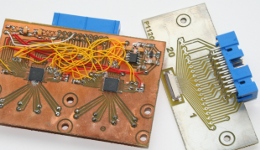
This is where home etching comes in, as I can get from layout to finished board in less then an hour. Examples on the left: A photodiode detector board with two QFN-48 ICs and an 0.1"-to-0.5mm adapter board. The one on the left mixes etched PCB tracks for critical analog signals and wires for the other connections.
Layout
For simple layouts that will not be subsequently made externally I tend to use the free ExpressPCB. It can't export Gerber files, but I print the top and bottom copper layers to a PostScript file. For more complex layouts that we intend to have externally made after testing a first version we use Protel from which we output Gerber file data. I then use the freeware ViewMate Gerber file viewer to again print to PostScript. In both cases I use Adobe Illustrator to clean up the PostScript file and print the artwork on inkjet film.
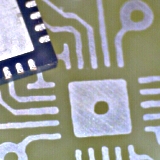
I can reliably etch PCBs for 0.5mm pitch components as shown right, but there are some design limitations for our home-made PCBs. The biggest is that we can't make plated-through holes, but have to solder component leads on both sides which is not always possible (e.g. on connectors). Vias are also awkward. This means we need to keep tracking fairly simple and use 0-ohm links or wire bridges to cross tracks - this also reduces the time it takes to make the layout in the first place. The left board in the top picture shows such a "hybrid", where the analogue connections are made by PCB-tracks and the digital connections are wired.
Expose and develop
I've made my own UV-exposure units from an old A4 scanner and some insect-zapper tubes. I always use pre-sensitised boards and have no experience with spray-on photoresist. With these boards from RS I get good results with an exposure time of 2-3 minutes per side.
Once exposed I develop the boards with RS universal developer. For the RS boards the developer is used at half the concentration stated on the jar. Timing is not that critical - it typically takes a minute or so - but make sure the developer is at room temperature: If it's too warm it eats away your layout in seconds. As I don't make boards that often and developer degrades over time I just make a fresh solution every time - and my 500g jar of developer still lasts forever.
Etching, stripping and tin-plating
I etch with hot (45°C) concentrated FeCl3 solution agitated with an airstone and an aquarium pump. Wear old clothes and use a drip tray as etchant stains are almost impossible to remove. Etching typically does not take more then 10 minutes if you've flooded the layout with ground plane to minimise the amount of copper that needs to be etched away.
After etching rinse the board with water and strip of the solder resist - I use a Seno applicator - I plate the bare copper with a thin layer of tin using Seno Immerse Tin (halfway down the page).
Drilling, cutting and routing
In my layout I change all drill hole sizes to 0.3mm, as this gives me just enough of an etched hole to centre the drill. With the small solid carbide PCB-drills with 1/8" shaft it's necessary to use a drill stand as even the smallest lateral movement will snap the drill. I've got a 32,000rpm spindle attached to my mill and can use the digital position read-outs to accurate drill holes and route the board outline. It will even be better once it's converted to CNC! It looks a bit disproportionate though seeing a 160kg milling machine holding a 0.5mm drill...